“You have a pending appointment request” on Instagram: what it means
Got a pending or new appointment request on Instagram? What it means, where to find it, how to answer it, and what “Booked” means in your chats.
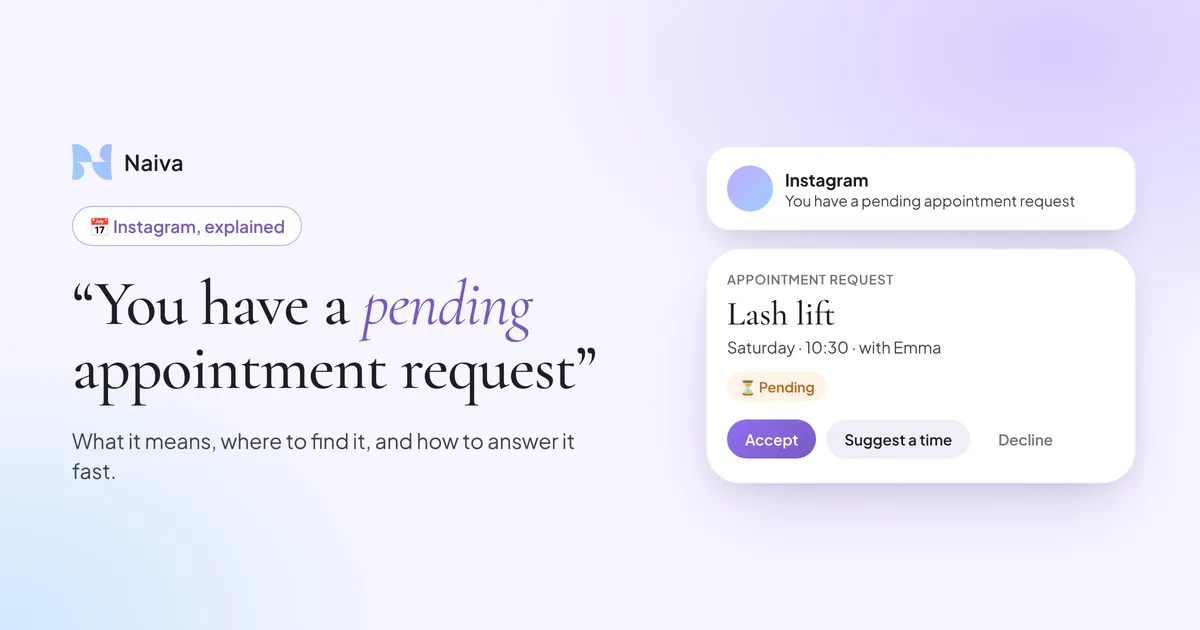
What does "You have a pending appointment request" mean on Instagram?
It means someone asked for an appointment through the booking feature linked to your professional profile, and the request is waiting for you. Until you accept it, decline it or suggest another time, it stays "pending" and the client has no confirmed slot. Open the notification or your inbox, check the requested service and time against your calendar, and answer as soon as you can: a client who waits too long books somewhere else.
You check your phone between two clients and Instagram tells you that you have a new or pending appointment request. You didn't know your profile could receive those, and you're not sure what the client sees on her side.
Here is what these notifications mean, where they come from, and what to do with them when you work alone and can't answer in the middle of an appointment.
What is an appointment request on Instagram?
Instagram lets professional accounts (Business or Creator) add an action button to their profile, such as "Book" or "Reserve". That button is powered either by Meta's own appointment tools or by a booking partner you connected. When a client taps it and picks a service and a time, you receive an appointment request.
- Who can receive one: only professional accounts that turned on a booking action, directly or through a connected partner. A personal account never gets them.
- What the client sees: her request, with the service and time she chose, marked as waiting for your answer.
- What you see: a notification ("You have a new appointment request"), then a reminder that it's still pending if you haven't answered.
If you never set up a booking button yourself, check your profile's action buttons in the professional settings: a partner app you connected in the past may have added one.
"You have a new appointment request": where to find it and how to answer
The exact menus change with the app version and the country, so take these steps as a guide and follow what your app shows.
Open the notification
Tapping it takes you to the request. If you swiped it away, look in your inbox and in your professional dashboard, or in the partner app that powers your booking button.
Check the service and the time
Compare the requested slot with your real calendar before saying yes. A slot that looks free on Instagram may already be taken in the calendar you actually use.
Accept, decline or suggest another time
Accepting confirms the appointment for the client. If the time doesn't work, suggest another one rather than declining without a word: she asked you, she wants to come.
Don't leave it pending
As long as you do nothing, the request stays pending and the client has nothing confirmed. That's why the "pending appointment request" reminder exists: it's Instagram telling you someone is waiting.
Based on Meta's public help pages and booking partners' documentation, checked on November 4, 2026. Instagram renames these menus often: if a step looks different, follow your app.
"You have an upcoming appointment": the reminder
Once an appointment is confirmed, Instagram or the booking partner can remind you of it shortly before it starts. Depending on the tool, the client may get a similar reminder on her side. It's a reminder, not a new request: there's nothing to accept.
What does "Booked" mean in an Instagram chat?
In a professional inbox, a conversation can show that an appointment was booked with that person, so you can tell at a glance which chats turned into a client. It is a status on the conversation, not a message from the client.
If you take your bookings in DMs, use it to keep track: a chat marked as booked doesn't need a follow-up, the others might.
Pending requests when you're with a client
When you work alone, requests and messages arrive while your hands are busy. Most clients don't start with a booking request: they first ask the price, how long it takes, or whether you have a slot on Saturday. If nobody answers, they don't send the request at all.
“I couldn't answer in the middle of an appointment. So I answered at night, exhausted, for an hour and a half.”
That's the gap Naiva fills. You get your own booking page on naiva.ai, with your services, options and only your real free slots, to put in your Instagram bio. And Naiva answers your DMs in your words, day and night: price, availability, address. When a client wants to book, it sends her your page, and she books on her own. When it's unsure, it hands the conversation back to you.
To compare the ways of taking appointments from Instagram, read our guide to booking appointments on Instagram. And to see what a slow reply costs, check the real numbers on DM response time.
Your questions
Frequently asked questions
Related articles
Instagram DMs: how to stop losing clients as a beauty professional
Getting DMs but can’t reply fast enough? Learn how to stop losing clients because of unanswered messages.
How many clients are you losing by not answering your Instagram DMs? (the real numbers)
Real stats on revenue loss linked to Instagram DM response time. Interactive calculator included.
Beauty salon: should you reply to Instagram DMs in the evening and at weekends?
The dilemma every beauty pro faces: reply to DMs in the evening or protect your personal time? Discover the third way.
Instagram for estheticians: 7 strategies to turn followers into clients
You post, you get likes, but your followers don’t book? Here are 7 concrete strategies to convert on Instagram.
How to retain clients as an independent hairdresser (without complicated software)
Your clients leave without warning? Discover the real retention levers for independent hairdressers: post-visit follow-up, DM responsiveness and personalised communication.
The 10 questions your clients ask in Instagram DMs (and how to reply without spending 2 hours)
Pricing, availability, duration… Your clients always ask the same DM questions. Here are the 10 most common with a model answer for each.
Independent hairdresser: how to find clients on Instagram in 2026
Optimised profile, strategic content, Reels, hashtags, DM management… The complete guide to filling your schedule through Instagram.
Instagram for nail techs: how to fill your schedule through DMs
Are you a nail tech with unanswered Instagram DMs? Learn how to turn every message into a booking.
How to use Instagram for your beauty salon: the complete guide
Profile, content, DMs, automation: the complete guide to turning your Instagram account into a real booking machine for your beauty salon.

Taking bookings through Instagram DMs: never miss one again
Most of your appointments start with a private message. Here is how to handle booking requests in your Instagram DMs and stop losing clients.
Attracting clients for your spa or beauty institute on Instagram
Your spa is gorgeous but Instagram isn't filling your rooms? Here is how to attract a premium clientele and turn followers into bookings.
Instagram for barbers: fill your barbershop's schedule
Barbering is one of the most visual trades there is. Here is how to use Instagram to show your style, build loyalty, and fill your chair.
Instagram for makeup artists: turn messages into booked work
Weddings, shoots, parties… your makeup work is almost always booked after a DM exchange. Here is how to stop losing those leads.
Booking on Instagram: how to take appointments without sending clients elsewhere
Link in bio, DM request, or booking inside the conversation? Learn how to take bookings on Instagram without losing clients along the way.

The best salon booking system alternatives in 2026 (Fresha, Booksy, Treatwell, Planity)
Too expensive, too rigid? Here are the real salon booking alternatives, their limits, and the piece almost none of them cover.

How to answer Instagram DMs automatically with AI (without a clunky chatbot)
Most "DM automation" blasts messages out, it doesn't answer your customers. Here is how to use AI to actually reply to your incoming Instagram DMs, in your voice.
Who answers your salon's Instagram DMs while you work?
You post "DM me to book" and your inbox fills with price and availability questions. But who answers them when your hands are full? Here is the piece quietly costing you clients.
How much does Planity cost in 2026? The real pricing
Planity does not advertise its prices clearly. Here is what it really costs in 2026, what is included, the add-ons, and what your booking tool does not cover.
Planity vs Fresha: which one for your salon in 2026?
Planity or Fresha to run your salon? Price, commission, marketplace: the honest comparison, and the question neither of them solves.
Fresha pricing in 2026: the free plan, the fees and the real monthly cost
Fresha pricing in 2026, plan by plan, checked on Fresha's official site: the free trial, the fees, and what a solo salon really pays per month.